Real time architectural visualization uses a continuously rendered scene that responds to navigation, camera changes, design options, or other inputs. Its main value is not simply faster rendering. It changes what an audience can do with the visualization and how geometry, materials, lighting, cameras, performance, and quality control must be handled.
The practical question is whether that interaction provides enough value to justify additional scene preparation, optimization, testing, presentation design, and delivery support. Answering it requires looking beyond the engine or demonstration scene to the complete production path: source model, revision workflow, intended experience, target hardware, visual standard, and ownership after delivery.
Table of Contents
- What Real-Time Architectural Visualization Changes
- Where Real-Time Rendering Fits in the Pipeline
- Building a Real-Time Architectural Visualization Workflow
- Choosing the Right Real-Time Deliverable
- Quality Control and Production Constraints
- Deciding Whether to Adopt Real-Time Visualization
- FAQ
- What to Do Next?
What Real-Time Architectural Visualization Changes
Real-time rendering continuously generates images within a defined performance budget. Instead of waiting for a completed frame or sequence, the scene can respond while it is being used. A viewer might move through a building, switch materials, compare design states, adjust the time of day, or inspect a space from an unplanned viewpoint.
That responsiveness changes the deliverable. A fixed image is composed around one camera. The image-maker controls framing, visual hierarchy, lighting, visible detail, and the precise relationship between foreground and background. A pre-rendered animation adds movement, but its route and pacing remain authored. An interactive environment transfers part of that control to the presenter or viewer.
Consider three outputs made from the same building model. A hero image can present the strongest façade angle under carefully directed light. A film can reveal the arrival sequence at a controlled pace. An architectural walkthrough can let a reviewer leave the intended route and inspect circulation, room connections, or visibility between levels. The walkthrough supports spatial inquiry, but it also gives up some compositional control and exposes more of the model to scrutiny.
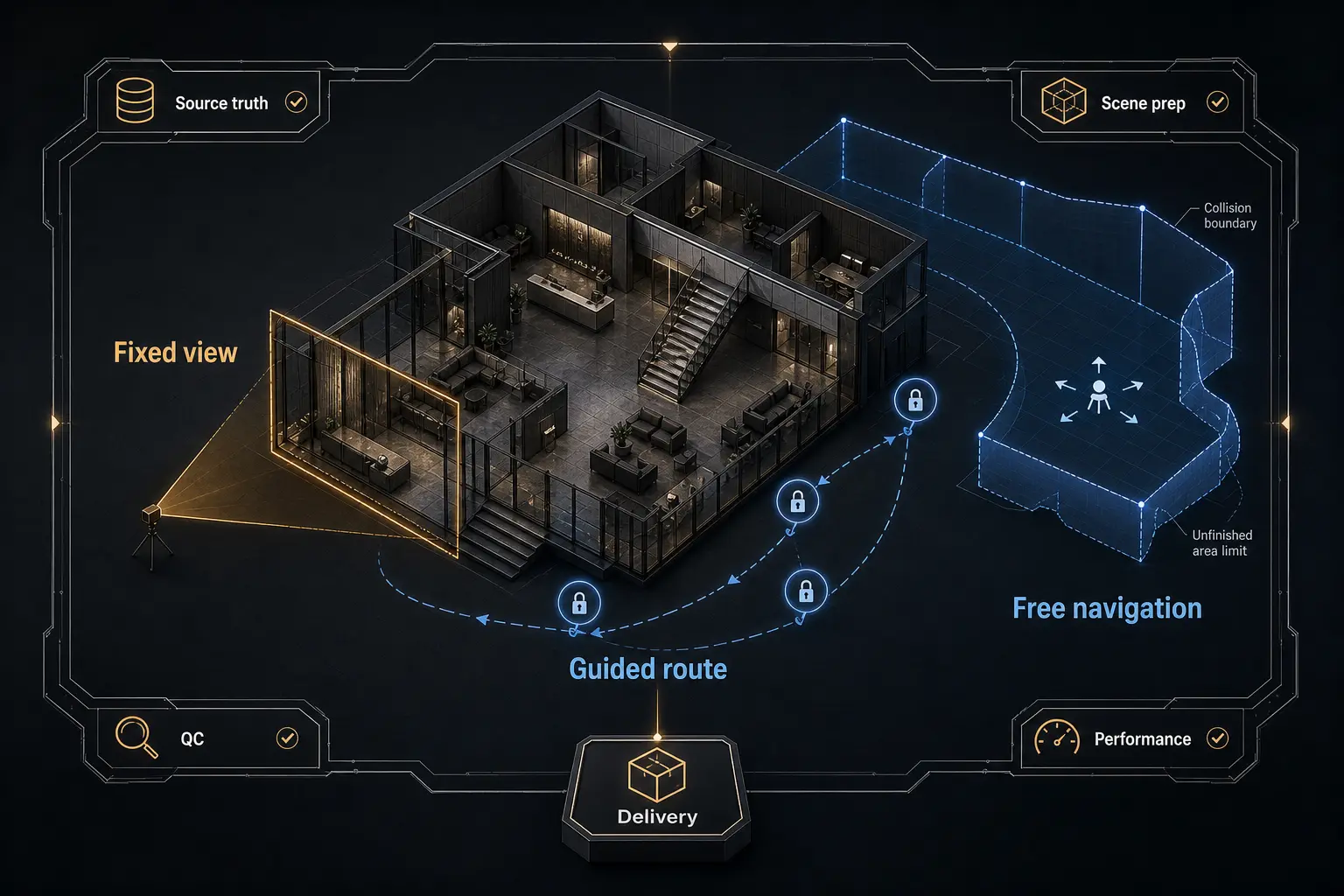
This creates a control continuum. Fixed images provide the most control over what is seen. Guided experiences preserve authored viewpoints while permitting limited movement or choice. Free navigation offers the greatest audience agency, but requires broader scene coverage, clearer movement rules, more stable performance, and more extensive testing.
Real-time feedback during production is not the same as an interactive final deliverable. A studio can use a responsive viewport to adjust materials, lighting, and cameras while still delivering fixed images. Real-time archviz becomes an interactive deliverable only when navigation, choices, interface behavior, scene boundaries, and the audience experience are deliberately designed.
Where Real-Time Rendering Fits in the Pipeline
Real-time technology can occupy several positions in a visualization pipeline. It can provide rapid visual feedback during scene development, support collaborative design review, produce controlled images or sequences, or become the environment delivered to an audience. These roles may use the same engine, but they do not have the same production requirements.
A review scene can tolerate provisional materials if its purpose is to examine circulation. A polished presentation cannot. A real-time engine used only for fixed output does not need the collision, navigation constraints, interface states, or complete spatial coverage required for free movement. Defining the role first prevents the project from accumulating interactive complexity that supports no actual decision.
The critical pipeline question is the source of truth. The team must know where approved geometry, material intent, metadata, and design options originate. It must also know what happens when that source changes. Architectural authoring tools, visualization applications, real-time engines, and delivery platforms often represent information differently, so an initial import is not the same as a maintainable update path.
Suppose a project receives weekly design updates. One workflow manually rebuilds imported objects, materials, and visibility settings before every presentation. Another defines a repeatable sequence: import the approved model, isolate changed elements, clean the hierarchy, restore material assignments, validate design states, and review the resulting scene. The second workflow is not valuable merely because it imports faster. It is valuable because responsibilities and checks remain understandable through repeated revisions.
The engine may therefore become the main visualization environment, operate as a parallel presentation branch, or act as a review layer fed by another production pipeline. The right position for real-time rendering in architecture depends on the priority: art-directed image quality, revision speed, repeatable outputs, live interaction, or clearer design communication.
Building a Real-Time Architectural Visualization Workflow
An Unreal Engine architectural visualization workflow begins before the model reaches the engine. Input assessment should examine units, coordinates, hierarchy, naming, geometry quality, repeated elements, material assignments, and the design status of the source. Poorly structured inputs create problems that optimization alone cannot solve.
Geometry preparation means deciding what the experience actually needs. Unseen construction detail may be removed, repeated objects may be handled as reusable assets, and problematic geometry may need correction. Objects expected to change should remain identifiable and replaceable. Scene organization must support updates, collaboration, selective loading, and troubleshooting rather than merely making the first import look tidy.
Materials require translation, not blind transfer. A material carrying useful source-model information may still lack the surface response, texture scale, variation, or parameter structure needed for a finished visualization. Lighting introduces a connected set of decisions: exposure, reflections, shadow behavior, interior-to-exterior transitions, and consistency across the intended viewing conditions.
Cameras and navigation should be treated separately. Authored cameras preserve composition and provide dependable presentation views. Free movement requires collision, movement constraints, appropriate eye height, scale cues, accessible routes, and boundaries that prevent viewers from reaching incomplete or irrelevant areas. A scene that works from three approved cameras is not automatically ready to be explored.
Performance budgeting belongs throughout production. Geometry density, material complexity, texture use, lighting, reflections, scene extent, output resolution, target hardware, and desired frame stability affect one another. There is no useful universal polygon count or texture limit; the budget must be tested against the actual scene, platform, and presentation conditions.
A hypothetical lobby workflow might follow this sequence:
- Audit the architectural model and establish the approved design state.
- Clean and organize geometry while preserving objects expected to change.
- Translate materials and verify their scale, color, reflectivity, and consistency.
- Establish lighting and exposure for the intended viewpoints and movement range.
- Create guided cameras, then configure navigation boundaries and collision.
- Test visual fidelity, missing assets, architectural correctness, performance, and revision integrity.
- Package and test the experience outside the development environment.
Packaging is a production stage, not an export afterthought. A working editor scene may depend on development settings, local files, specialist controls, or hardware that the final audience will not have. Delivery testing must cover startup, loading, input behavior, navigation, failure recovery, and the intended presentation setup.
Choosing the Right Real-Time Deliverable
Interactive architectural visualization is not one format. It can be an operator-led presentation, a guided walkthrough, a free-roaming environment, an option configurator, an internal design-review scene, or a source for fixed images and films. The appropriate format depends on the audience, setting, decision being supported, useful degree of freedom, and technical support available.
An operator-led presentation works well when a knowledgeable presenter must maintain pacing and direct attention while responding to questions. A guided experience allows an audience to move between prepared viewpoints without exposing the entire scene. A free-roaming architectural walkthrough is more appropriate when spatial exploration itself is the objective. An option configurator is useful when finishes, layouts, or other design states must be compared, provided every permitted combination is valid and visually checked.
For example, a planning review focused on circulation may benefit from broad movement and modest visual finish. A stakeholder meeting comparing two material schemes needs controlled cameras and reliable option switching more than unrestricted navigation. A public presentation intended to communicate atmosphere may be stronger as a guided experience supplemented by carefully art-directed images or film.
Good interactive architecture presentation requires experience design. Useful viewpoints must be discoverable, movement must be understandable, choices must be bounded, and transitions must not disrupt orientation or exposure. More interaction is not inherently better. Every option creates another state to maintain, test, explain, and keep visually credible.
Hybrid delivery is often reasonable because the outputs answer different questions. Fixed images can communicate a deliberate visual proposition. Film can control sequence and emphasis. An interactive environment can support inspection and comparison. Using related scene data does not make these deliverables interchangeable.
Quality Control and Production Constraints
Visual plausibility and architectural correctness are separate quality criteria. A scene can look convincing while containing outdated geometry, incorrect dimensions, missing objects, inaccurate materials, inconsistent visibility states, or invalid option combinations. Architectural review therefore requires comparison against approved source information, not only a visual judgment that the result appears believable.
Interaction also expands the quality-control surface. A fixed camera can avoid unfinished ceilings, landscape boundaries, back-of-house areas, weak transitions, or incomplete neighboring spaces. Free movement can reveal all of them. The more freedom an audience receives, the more completely geometry, materials, lighting, collision, and visual hierarchy must hold together.
Common failure modes in real-time archviz include:
- Model updates that duplicate, remove, or reposition objects unexpectedly.
- Material assignments that change after geometry is replaced.
- Navigation collision that blocks valid routes or permits invalid ones.
- Abrupt exposure changes between interiors and exterior views.
- Design options that create untested combinations or contradictory states.
- Performance that appears stable on a production workstation but fails on delivery hardware.
Imagine an interactive apartment that performs well from approved viewpoints. Users then enter an untested room, switch finishes repeatedly, and look back at the exterior from an unintended angle. Missing ceiling geometry becomes visible, an invalid material combination appears, and performance becomes unstable as additional spaces enter view. Camera boundaries, validated option states, broader scene coverage, and testing on the intended hardware address these issues before delivery.
There is a persistent tradeoff between visual fidelity, movement freedom, revision speed, performance stability, and delivery simplicity. Maximizing all five is rarely realistic. Production judgment means deciding which conditions are essential, documenting known boundaries, and ensuring the experience remains reliable outside the artist’s development setup.
Automated checks can identify missing files, unexpected object counts, naming errors, or performance warnings, but human review remains necessary. Composition, material intent, architectural meaning, atmosphere, navigation clarity, and the credibility of design states cannot be reduced to one technical pass-or-fail test.
Deciding Whether to Adopt Real-Time Visualization
The adoption decision should begin with the communication problem. What must the audience inspect, compare, understand, or decide that a fixed image or film cannot support as effectively? If there is no clear answer, interaction is likely to add production work without equivalent communication value.
A practical evaluation can be organized around six questions:
- Is interaction necessary to support the intended decision?
- Must design options change live?
- How much camera freedom is genuinely useful?
- What level of visual consistency is required across views and states?
- Which platform and class of hardware must run the experience?
- Who owns model updates, testing, delivery, and future maintenance?
Real time architectural visualization is a strong fit when repeated design review, spatial evaluation, live option comparison, guided presentation, or audience agency has clear value. It can also support multiple outputs from one maintained scene, provided the pipeline preserves consistency across those outputs.
It is a weaker fit when the requirement is a small set of tightly art-directed images, the source model changes unpredictably without an update strategy, the interactive purpose is undefined, delivery conditions are unsupported, or the schedule leaves no room for performance and experience testing. Unreal Engine or another real-time system should be treated as an implementation choice, not as the reason to create an interactive deliverable.
A bounded pilot is safer than replacing an established pipeline immediately. Select one representative scene, one audience, one interaction model, one delivery platform, and one genuine design revision. For example, test an interior zone with two approved material options and a guided navigation path. Carry a source-model change through import, cleanup, material validation, lighting review, packaging, and presentation.
Evaluate the pilot by visual fidelity, update effort, navigation clarity, performance stability, revision errors, and usefulness to the intended audience. A successful demonstration proves that a scene can be made. A successful revision cycle provides stronger evidence that the workflow can be maintained.
FAQ
Can real-time visualization replace offline rendering?
Replacement is usually the wrong default framing. Real-time and offline methods overlap, but they offer different balances of interaction, camera control, visual finish, revision handling, hardware requirements, and delivery complexity. A hybrid pipeline is legitimate when fixed images, films, and interactive environments serve different communication needs.
How much model preparation does real-time archviz require?
The workload depends on source-model quality, scene complexity, update frequency, platform, and intended interaction. Typical preparation covers hierarchy, naming, geometry, repeated assets, material assignments, unnecessary detail, collision, scene organization, and validation. The update path often matters more than the effort required for the first import.
Is an architectural walkthrough the same as an animation?
No. An animation has fixed camera movement and pacing, even if it depicts movement through a building. An interactive walkthrough responds to user input. A guided real-time walkthrough sits between them by preserving authored viewpoints or routes while permitting limited navigation.
Does Unreal Engine improve architectural design review?
It can support spatial inspection, live viewpoint changes, and option comparison, but the software alone does not improve review. The result depends on reliable source data, clear review objectives, controlled design states, accurate updates, understandable navigation, and appropriate visual fidelity.
What should be tested before delivering an interactive presentation?
Test architectural correctness, materials, lighting, cameras, navigation, collision, scene boundaries, option states, missing assets, loading behavior, controls, and recovery from unexpected actions. Performance should be checked on the intended class of delivery hardware, and the presentation should remain understandable outside the development environment.
What to Do Next?
Create a one-page pilot brief before selecting an engine or rebuilding a scene. Define the audience, communication purpose, deliverable, interaction boundaries, source of truth, update frequency, target platform, visual requirements, validation checks, and ownership.
Choose one representative area containing realistic geometry, materials, lighting, navigation, and revision challenges. Test the complete path from a genuine source-model change to the final presentation, then compare the result with a fixed image, animation, or simpler review method. Expand the workflow only if its interaction value, update path, quality controls, and delivery conditions remain convincing through that cycle.