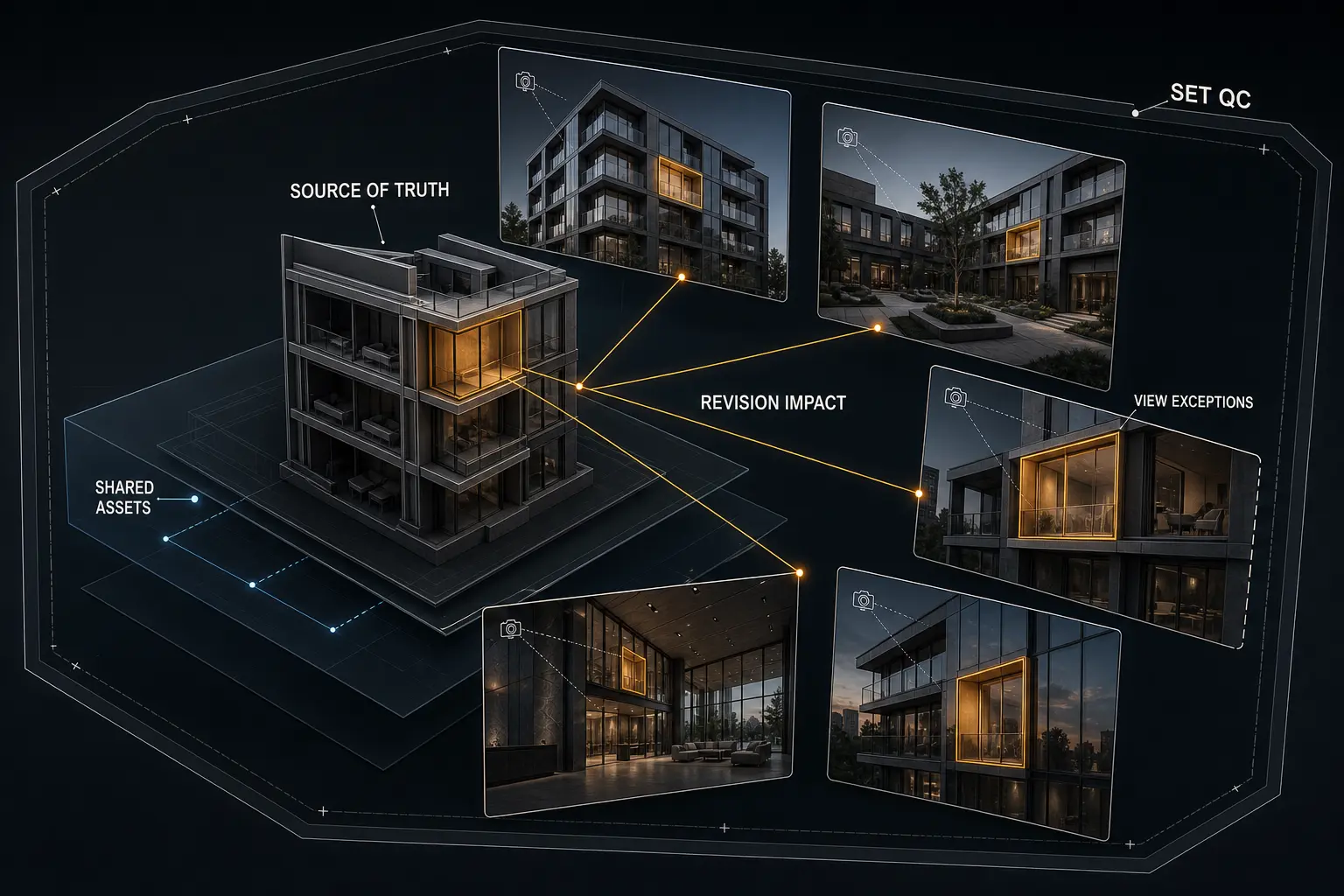
Architectural visualization consistency is the preservation of architectural facts and intentional visual relationships across an image set, even as designs, materials, cameras, or individual images change. It covers far more than matching color grades. Images can look polished and stylistically related while contradicting one another in their geometry, finishes, fixtures, landscape, reflections, or design state.
The practical difficulty is that apparently local changes rarely remain local. A revised balcony glazing can appear in several cameras and may affect reflections, shadows, sightlines, and retouched masks. A dependable workflow therefore needs a source of truth, structured shared assets, controlled view-level exceptions, revision impact tracking, clear boundaries for AI-assisted work, and set-level quality control.
Table of Contents
- What Architectural Visualization Consistency Actually Requires
- Establish a Source of Truth Before Producing Multiple Views
- Structure the Scene for Consistent Architectural Views
- Manage Design Revisions Across the Entire Image Set
- Control AI-Assisted Image Variations Without Losing Design Fidelity
- Quality-Control a Consistent Architectural Rendering Set
- FAQ
- What to Do Next?
What Architectural Visualization Consistency Actually Requires
A consistent image set agrees on what the architecture is. Openings, dimensions, facade modules, fixtures, furniture, landscape, material assignments, finish transitions, and other visible design facts must belong to the same approved state unless an exception is deliberate. This is architectural consistency: the images do not make conflicting claims about the project.
Visual consistency concerns a different layer. Lighting logic, exposure, contrast, color treatment, atmosphere, sharpness, and presentation style should support one visual direction. That does not mean every image needs identical brightness or mood. A shaded courtyard can be quieter than a sunlit exterior, while an interior may require warmer practical lighting. The variation is coherent when its cause is understandable and its treatment belongs to the same directed sequence.
Camera continuity also needs active control. Position, lens behavior, framing, vertical correction, output ratio, crop, clipping, and approved viewpoint state all affect what an image communicates. A late camera movement can expose unfinished geometry, change facade prominence, alter reflections, and misalign earlier post-production.
A useful model for multi-view architectural visualization separates consistency into four layers:
- Model truth: shared geometry, material identity, landscape, furniture, lighting elements, and recurring assets.
- View state: camera settings, visibility, staging, exposure choices, and documented local overrides.
- Image treatment: masks, compositing, retouching, color, atmosphere, and replaceable elements.
- Approval state: the design version, camera, interpretation, and final output that have been reviewed.
This model distinguishes consistency by appearance from consistency by provenance. Images can look related while originating from incompatible models, outdated renders, or different approvals. Consider a hypothetical five-view residential set: one exterior shows revised balcony glazing while another retains the previous railing design. Both may be convincing standalone images, but architectural rendering consistency has failed because they represent different design states.
Visual plausibility is not proof of architectural correctness. A realistic reflection can contain an obsolete facade. A beautifully graded interior can show the wrong window spacing. Reliable consistency requires both visual judgment and traceable production decisions.
Establish a Source of Truth Before Producing Multiple Views
Before multiple views enter full production, define the current design baseline. Visualization teams may receive fragmented or incomplete design information. Geometry may come from one issue, finishes from another, camera direction from marked-up images, and presentation references from an earlier review. The response is to identify which source governs each decision and record unresolved conflicts.
A practical reference hierarchy has four levels: authoritative design information, approved visualization interpretation, view-specific direction, and superseded material. Authoritative information controls architectural facts such as geometry or specified finishes. An approved visualization interpretation resolves areas where design information requires visual translation. View-specific direction applies only to a named camera. Superseded material remains available for traceability but must not compete with current references.
This hierarchy gives the architectural rendering workflow a controlled baseline. Filenames alone are weak version control because labels can be ambiguous and files can arrive through multiple channels. A useful record identifies the subject, governing source, decision, status, affected assets, and unresolved questions.
Suppose a finish schedule specifies one stone, a later marked-up elevation suggests another, and an earlier approved rendering shows a third interpretation. Matching whichever reference is easiest to find creates hidden drift. The governing source should be confirmed, the choice recorded, the shared material updated, and the older rendering marked as superseded.
Unresolved information deserves an explicit state. A temporary facade material or assumed furniture layout should be labelled provisional. Otherwise, repeated use can give an assumption false authority.
Important cameras, materials, models, and outputs should have named or versioned states. Preserve each approved state, identify what replaced it, and avoid overwriting the only traceable reference.
Finally, distinguish shared rules from view-level exceptions. A project-wide material change belongs in the shared source. Removing a foreground chair from one camera to clarify circulation may be a legitimate local choice. That exception should be limited, named, and reviewable rather than silently copied into the master setup.
Structure the Scene for Consistent Architectural Views
Scene structure should reflect the difference between project truth and camera-specific presentation. Where the production setup permits, shared geometry, materials, landscape systems, and recurring assets should remain centralized. View-specific staging, visibility controls, composition aids, exposure adjustments, and local lighting refinements should remain separate. This reduces duplication without making every frame rigidly identical.
In multi-view architectural visualization, unnecessary local copies are a common source of drift. A duplicated facade zone may retain outdated mullions. A copied material may miss a revised texture scale or reflectance adjustment. An independently updated furniture asset may differ from the same object elsewhere. Centralized assets improve architectural rendering consistency because one approved change can propagate to every dependent view.
Stable naming and grouping make dependencies legible. Cameras should identify their view and state, while materials should describe their design identity. Revision-sensitive model zones, lights, landscape elements, and recurring objects should be easy to locate when a change arrives.
Preserve their transforms, lens values, output ratio, vertical correction, crop, and relevant clipping settings. If a camera must move, treat that as a revision with downstream consequences rather than a harmless framing adjustment. Even a modest change can invalidate object masks, painted extensions, entourage placement, depth effects, and retouched geometry.
Local overrides are not inherently mistakes. An obstruction may be hidden to communicate an entrance clearly. Practical light intensity may need a camera-specific adjustment for a particular exposure. Entourage may change to improve composition and visual hierarchy. The production requirement is that each override remains intentional, isolated, and traceable rather than being mistaken for a global rule.
For example, imagine one lobby finish appearing in three interior cameras. The base material remains shared, while each camera retains documented staging or exposure adjustments. When the finish specification changes, the material update propagates across all three views without erasing their individual compositions.
Continuity must extend into post-production. Organized masks, channels, layer names, and replaceable elements preserve the relationship between the render and final image. If a facade revision requires a new base render, the compositor should be able to identify which adjustments remain valid and which were tied to obsolete edges, reflections, or geometry.
Manage Design Revisions Across the Entire Image Set
Each revision should begin with three questions: what changed, what did not change, and which source authorizes the change? This prevents a markup from being interpreted more broadly than intended and stops unrelated approved work from being reset during an update.
Classifying archviz revisions makes their reach easier to understand. A change may be global, regional, view-specific, material-only, camera-related, lighting-related, or post-production-only.
The next step is revision impact mapping. Connect the changed item to every part of the architectural rendering workflow it can affect:
- Model geometry and adjacent components.
- Material assignment, texture mapping, joints, and finish transitions.
- Camera visibility, interior sightlines, and composition.
- Shadows, reflected elements, glazing, and daylight behavior.
- Entourage, landscape, signage, or furniture positioned around it.
- Object masks, retouched edges, painted details, and final composites.
- Every view in which the element appears directly or indirectly.
Hidden dependencies cause many set-level failures. A facade change may become visible from an interior through glazing. Revised planting may alter shadows and reflected greenery. A camera adjustment may invalidate paint work even though the architecture itself is unchanged. Review should follow actual visibility and image construction, not only the name of the revised object.
Consider a window module that becomes wider after three exterior views and one interior have reached post-production. The change affects more than the opening. Mullion spacing, adjacent cladding, interior sightlines, reflected context, daylight distribution, masks, and retouched facade elements may all require updates. Correcting only the most obvious exterior frame leaves the set unreliable.
Shared sources should normally be updated before local repairs. If accuracy matters, re-render or re-composite from the revised source rather than disguising a structural contradiction with paint work. Manual retouching remains valuable for finishing, cleanup, and controlled visual adjustments. It becomes risky when it conceals disagreement between the composite and the underlying design state.
After applying a revision, inspect both the changed area and its unchanged neighbors. Imports, replacements, relinking, and scene resets can move objects, alter mapping, restore hidden elements, or disturb lighting. A narrow check confirms the requested edit; a contextual check detects collateral damage.
Approval must exist at both view and set levels. One approved frame does not establish architectural visualization consistency across the complete package. Each image needs a known state, and the release set must confirm that all included views refer to compatible design information, documented exceptions, and synchronized outputs.
Control AI-Assisted Image Variations Without Losing Design Fidelity
It should not be assumed to preserve exact architectural details simply because the result looks convincing.
The acceptable tolerance depends on the production stage. Early atmosphere studies can accommodate variation because their purpose is exploration. An approved multi-view set requires tighter control: repeated elements need stable identity, architectural edges must remain verified, and camera relationships cannot drift unpredictably. Exploration and controlled final output are different tasks.
When design fidelity matters, bounded interventions are safer than unconstrained regeneration. Start with a verified render as the structural base, define the region or replaceable layer being treated, and preserve protected architecture outside that boundary. The generated result remains a candidate. It must be compared with both the source render and other approved views before entering the composite.
Imagine an AI-assisted pass that improves planting and atmosphere in one exterior but subtly changes balcony edges and window divisions. Judging only the image’s attractiveness could allow the invented facade into delivery. A bounded workflow would isolate the planting treatment, retain the verified building geometry, compare recurring facade elements across views, and reject altered architectural pixels.
A prompt describes intent but does not prove geometric accuracy. Architectural visualization consistency depends on controlled sources: the model, verified render, approved camera, material decisions, and related views. Visual similarity can hide changes that become obvious during side-by-side review.
Geometry, camera states, and repeatable material identity should remain in the deterministic 3D pipeline when they must be exact. Generated variations should not become the propagation method for a design revision. If a balcony changes, update the controlled architectural source first, render the affected views, and then reapply bounded image treatments where appropriate.
A consistent architectural rendering workflow also retains reversibility. Keep the verified non-generated source, preserve the boundary between rendered and generated content, and record which image state was approved. Without that path back, a visually successful intervention can become difficult to reproduce or revise safely.
Quality-Control a Consistent Architectural Rendering Set
Visualization quality control should begin with the set, not the individual frame. Review all images side by side at a scale where repeated elements, overall color relationships, design states, and sequence become visible. Then inspect each image at full resolution for edge quality, masks, material detail, noise, retouching, and technical output.
Separate review passes are more effective than one unstructured “does it look finished?” check.
- Architecture: openings, facade modules, doors, fixtures, joints, furniture, landscape, and spatial relationships.
- Materials: assignment, identity, scale, finish transitions, reflectance, and repetition across views.
- Cameras: saved state, lens behavior, verticals, crop, framing, and output ratio.
- Lighting: sun and sky logic, practical lights, exposure relationships, shadows, and atmosphere.
- Styling: entourage, planting, object continuity, visual hierarchy, and intentional view-level variation.
- Post-production: masks, edges, obsolete paint work, distorted geometry, reflections, sharpness, and grade.
- Output: expected dimensions, synchronized versions, filenames, and approval status.
Architectural facts should be checked independently from image treatment. A persuasive grade can distract from a wrong finish or obsolete opening. Conversely, small tonal differences are not necessarily defects. The question is whether each variation serves the visual sequence or creates an unexplained break in time, weather, lighting, or presentation intent.
Recurring elements deserve targeted comparison wherever they appear. A stone finish may be correct in one view but mapped at a conflicting scale elsewhere. A door may have changed in the model yet remain painted into an older composite. Signage, planting, furniture, metal finishes, facade joints, and fixtures often reveal whether shared decisions have propagated.
Final composites should also be compared with verified base renders. This catches shifted architectural edges, changed perspective, inconsistent reflections, and retouching based on superseded geometry. If framing changed late, confirm the saved camera state and rebuild dependent masks or paint work rather than stretching an older composite into approximate alignment.
The final gate for architectural rendering consistency should confirm the correct design state, resolved exceptions, synchronized outputs, expected dimensions, and clear approval status for the set. This review should occur after meaningful revision rounds, not only before delivery. Early set-level checks find drift while its source is still identifiable; a final-only review often reveals several accumulated states at once.
Consistent architectural rendering is not the absence of artistic variation. It is a coordinated result in which architectural facts are dependable, camera and image states are controlled, and intentional differences remain visually and operationally explainable.
FAQ
Does architectural visualization consistency require identical lighting in every view?
No. It requires compatible lighting logic and intentional visual direction, not identical exposure or contrast. Different orientations, spaces, and compositions justify variation, but sun direction, time-of-day cues, practical lights, atmosphere, and grading should not create unexplained contradictions.
How can multiple artists maintain consistency across one architectural rendering set?
Use a shared source of truth, clear ownership of global assets, protected camera states, documented view-specific overrides, agreed visual references, revision records, and side-by-side set reviews. Artists do not need identical techniques, but they do need compatible decisions and approval states.
What should be locked before producing multiple architectural views?
Control the design version, key materials, primary cameras, output ratios, lighting direction, recurring assets, and presentation treatment. Mark unresolved items explicitly. “Locked” means approved or change-tracked, not permanently immune to a legitimate design revision.
Can AI fix inconsistent architectural renders?
AI can assist with bounded cleanup, atmosphere, or local image treatment, but it does not resolve conflicting source models, uncontrolled cameras, or incompatible design states. Structural contradictions should be corrected in the controlled production source and then reviewed across every affected view.
How should a late revision to one image be reviewed against the full set?
First confirm whether the request is genuinely view-specific. Then check shared geometry and materials, reflections, shadows, sightlines, recurring elements, and related post-production. The revised image should still belong to the approved architectural and visual state of the complete set.
What to Do Next?
Choose one active image set and identify its authoritative design source. Separate shared project truth from camera-specific exceptions, list recurring elements visible in multiple views, and map one recent revision across geometry, materials, cameras, lighting, reflections, masks, and post-production.
Review the complete set side by side and record contradictions by category before making isolated fixes. Start with revised geometry, recurring materials, protected cameras, and composites built from old renders. Correct the source, propagate the change, perform separate architectural and visual checks, and define a set-level release gate for the next revision round.